.png?width=161&height=26&name=SiteConnect%20Logos%20(LinkedIn%20Post).png)
Reminder emails only send when the relevant date is set on the asset and someone is enrolled in that reminder — and they skip decommissioned, sold, scrapped or archived assets.
At a glance
|
For |
Company administrators, site managers |
| Platform | Web Portal |
| Applies to | All regions |
| Time to Read | About 2 minutes |
| Checks in this article |
• No one is enrolled in that reminder. |
Checks to complete
No one is enrolled in that reminder
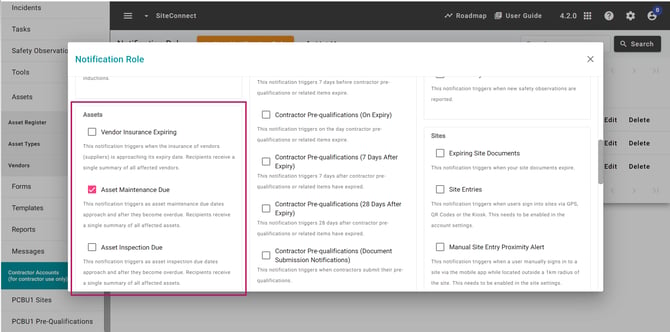
Check your notification settings for the matching reminder — Asset Maintenance Due, Asset Inspection Due, Asset Warranty Expiring, or Asset Expected Replacement.
Each reminder type is configured separately, so being enrolled for one Asset reminder does not enrol you for the others.
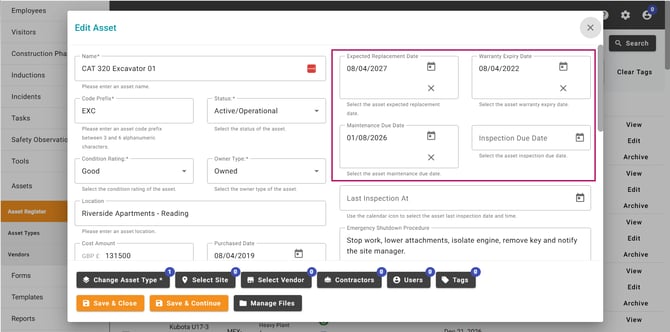
The relevant date isn't set
Reminders only trigger from a set maintenance due, inspection due, warranty expiry or expected replacement date on the asset.
The asset is archived or retired
Assets that are decommissioned, sold, scrapped or archived are excluded from reminders.
No asset reached a milestone that day
Reminders only send on specific milestones — 30, 14, 7, 1 and 0 days before the date, plus overdue intervals for maintenance and inspection. If nothing is due, no email goes out.
You're expecting an overdue warranty or replacement reminder
Asset Warranty Expiring and Asset Expected Replacement reminders are sent before the relevant date, but they do not continue after the date has passed.
The reminder hasn't reached its scheduled send time
Asset reminder emails are sent at 8am in your account's timezone. Check the account timezone and the reminder's scheduled milestone before assuming an email has been missed.
Result
You'll know it's working correctly when the recipient receives the next scheduled reminder email at 8am in your account's timezone.
When to contact SiteConnect Support
If you've completed the checks above and an expected reminder still isn't being sent, contact SiteConnect Support so the team can investigate the reminder configuration and account behaviour.