.png?width=161&height=26&name=SiteConnect%20Logos%20(LinkedIn%20Post).png)
Geofence sign-in and sign-out are controlled by three independent settings: the location permission a worker grants on their phone, the site's sign-out zone buffer, and an account-wide closing-time sign-out. Adjusting one has no effect on the others.
At a glance
|
For |
Company administrators and site managers |
| Platform | Web Portal and Mobile App |
| Applies to | All regions |
| Time to Read | About 3 minutes |
| You'll understand |
• What each setting controls. |
Location permission on the worker's phone
Choosing Always lets SiteConnect sign a worker in and out automatically, even with the mobile app closed. Anything less than Always — including When in use — may not reliably sign a worker in or out once the app is closed. Declining location access turns geofencing off for that worker; they sign in and out with a QR code instead. There's no on/off switch for geofencing inside the app itself — a worker changes this through their phone's own location permission, which is accessed under General Settings, then Open Native Settings.
The site's sign-out zone
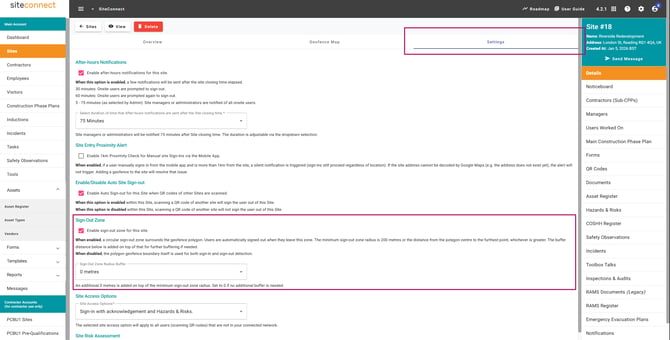
By default, the sign‑out buffer zone is already in place. This means that when a worker crosses back out of the drawn site boundary, they are automatically signed out. The buffer zone—ranging from 0 to 100 metres—is designed to prevent premature sign‑outs caused by minor GPS fluctuations near the boundary. If you prefer not to use this feature, simply remove the buffer zone under the site’s Settings tab. For step‑by‑step guidance, see How do I set up a sign‑out zone for a site.
Automatic sign-out after closing time
Automatically sign users out of site, under Configuration, signs out anyone still recorded on site 2 to 6 hours after that site's closing time, whether or not they're inside the geofence — a safety net for workers who don't leave cleanly.
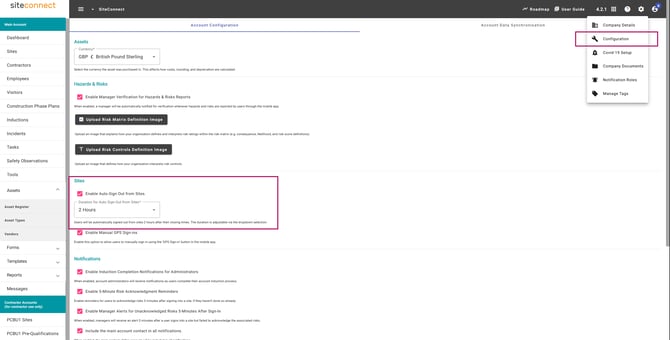
Note - this closing-time sign-out is independent of geofencing. It applies even to sites without a geofence drawn.