.png?width=161&height=26&name=SiteConnect%20Logos%20(LinkedIn%20Post).png)
Add the employee to the built-in Administrators role on the RBAC Roles page. Their Users role drops off at the same time, because nobody can hold both.
At a glance
|
For |
Company Administrators and anyone with View and Edit on RBAC roles. |
| Platform | Web Portal - Roles and permissions are not managed in the mobile app. |
| Applies to | All regions and subscription tiers |
| Time to complete | About 2 minutes |
| You'll learn how to |
• Add someone to the built-in Administrators role. |
Before you begin
You need View and Edit access for RBAC Roles.
Caution
Administrators have full access to everything included in your subscription, including RBAC Roles. They can change role permissions and who holds them, including other Administrators, so only give this access to people you trust to manage the whole account.
Step-by-step guide
Step 1: Open RBAC Roles
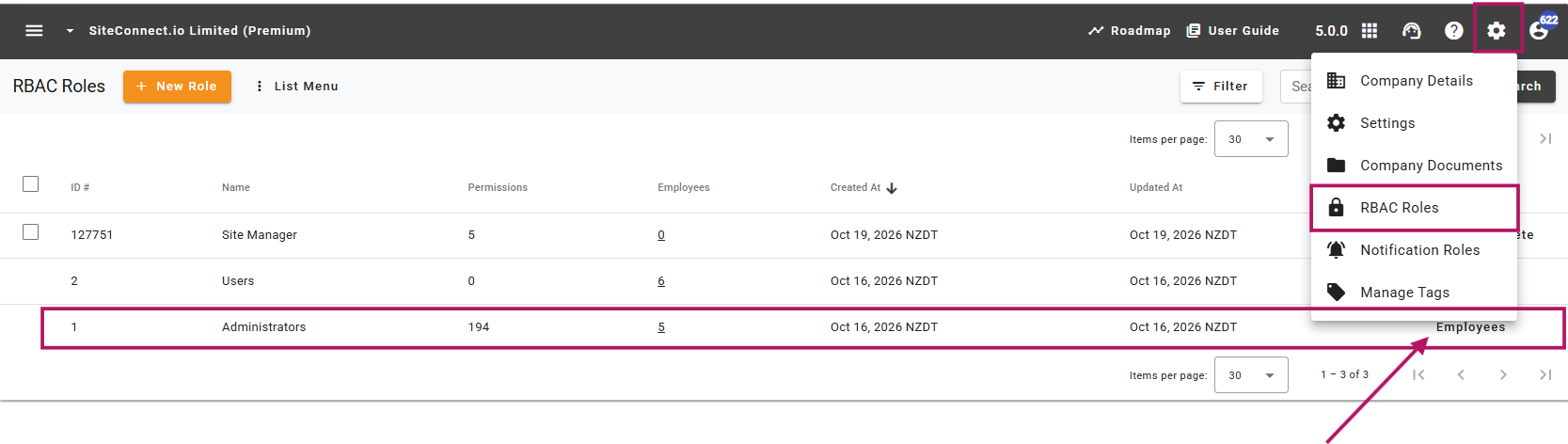
Select the settings (gear) icon in the top bar, then select RBAC Roles.
Step 2: Open the Administrators role
In the Administrators row, select Employees. Built-in roles show Employees instead of Edit.
Step 3: Open the Employees tab
In the dialog, select the Employees tab.
Step 4: Select the employee
Select Select Employees, choose the person you want to give Administrator access to, then confirm your selection.
Step 5: Close the dialog
Select the X to close the dialog.
You can also assign Administrators from an employee's profile or in bulk from the employees list. See How do I assign roles to employees?
Result
The employee moves from Users to Administrators and appears on the role's Employees tab.
Their access updates automatically the next time they use SiteConnect. They don't need to sign out and back in.
Administrator access covers everything included in your SiteConnect subscription.
Common issues
There's no Select Employees button
You have View access for RBAC Roles, but not Edit. Ask someone with Edit access to add the employee.
You want to give someone broad access, but not everything
The built-in Administrators role can't be edited. Create a custom role instead so you can choose the permissions they need.
SiteConnect asks you to assign another Administrator first
Add the new person to Administrators using the steps above, then try your original change again.
Next recommended step
If someone no longer needs full Administrator access, update their roles so they only keep the access their work requires.
Next article: How do I asign roles to employees?