.png?width=161&height=26&name=SiteConnect%20Logos%20(LinkedIn%20Post).png)
Create an Asset Type for a broad group of assets, then add optional Asset Subtypes where you need more detailed classification. A consistent structure makes the Asset Register easier to search, filter and maintain.
Use this guide to create one record manually. To add several types at once, see How do I import Asset Types from a CSV file?
At a glance
|
For |
Company administrators |
| Platform | Web Portal |
| Applies to | All regions |
| Time to Read | About 2 minutes |
| You’ll learn how to |
• Create an Asset Type. |
Before you begin
Make sure you have permission to manage Assets and have agreed how your organisation will classify its assets.
Agree a consistent naming convention before creating your structure. This reduces duplicate categories and makes the Asset Register easier to search and maintain.
Step-by-step guide
1. Open Asset Types
Go to Asset Types in the Web Portal.
2. Choose where to create the record
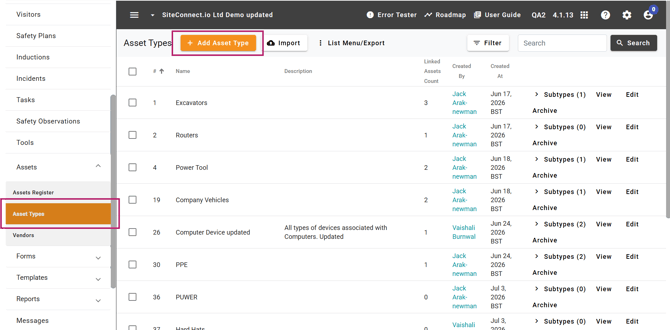
To create a top-level type, select Add Asset Type.
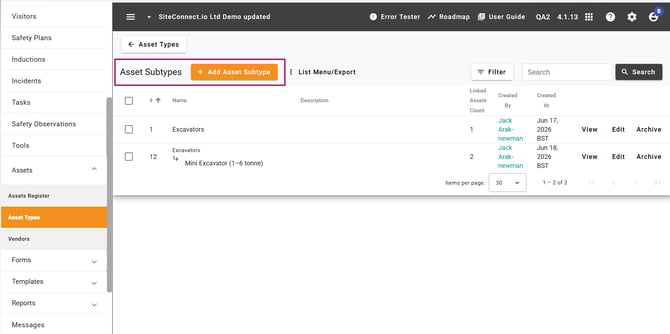
To create a subtype, open the relevant type’s Subtypes view, then select Add Asset Type.
3. Enter the details
Enter a Name and, where useful, a Description.
Asset Type names must be unique across your account. Asset Subtype names must be unique within their parent type.
4. Save the record
Select Save.
Result
The new Asset Type or Subtype appears in the relevant list and is ready to assign to an asset.
Next recommended step
Next article: How do I add an asset?